The channel table
Every test has one: the list of what was plugged in where, what each
channel measures, and what its calibration says. Visual Dynamics treats
it as a spreadsheet, so it imports from and exports to .xlsx and
works like every other table in the window.
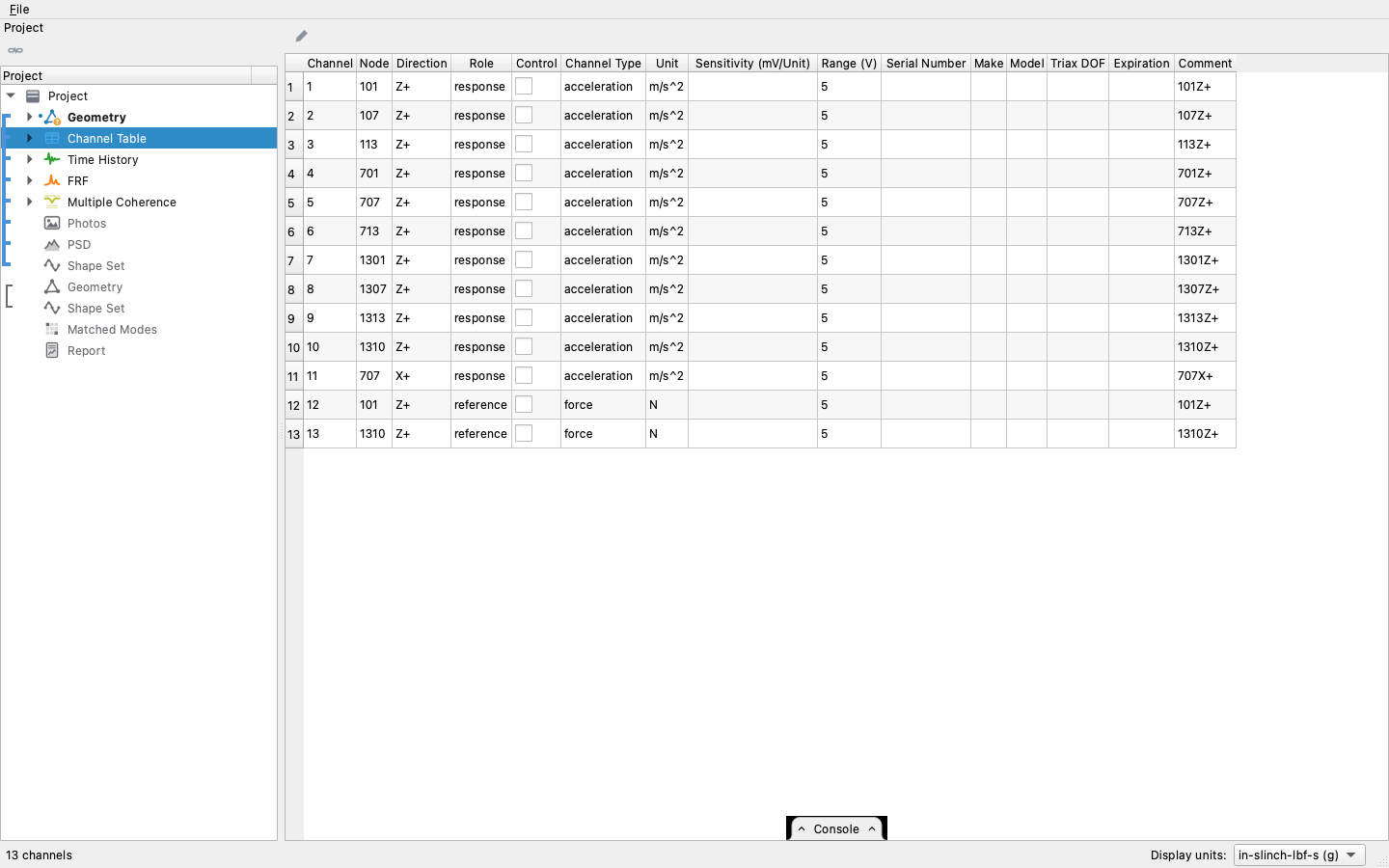
It is not a free-form sheet, though. Every column has a fixed type, which lets each column have rules about its contents: a direction can be a drop-down because there are exactly twelve of them, a unit can be limited to what the channel measures, and an expiration can offer a calendar.
Starting one by hand
A table usually arrives with a run or from a spreadsheet, but it can
also be typed in. New Channel Table, on the project row's bar, adds
an empty one. Add Channel, on the table's own bar, adds a blank row
numbered after the highest channel in the table, and puts the cursor
on it to fill in. From a script, project.new_channel_table() and
project.add_channels(name, count) do the same.
Selected together with a geometry, the table is drawn on it as arrows,
one per channel, picked by role from a drop-down on the 3-D view's bar
(the project tree);
geometry.plot_channels(table, role) draws the same from a script.
The columns
| column | holds |
|---|---|
| Channel | the number the hardware reports. A positive whole number, unique in the table, since it identifies the row |
| Node | the node the sensor is on. A whole number, or blank when nobody wrote it down |
| Direction | one of X+ X- Y+ Y- Z+ Z- or the six rotations |
| Role | reference (it drives), response (it answers), or monitor (recorded, but neither). When the table is linked with the time data it describes, this column shows the data's roles, and an edit here changes the data's role; see the tree |
| Control | whether the controller controlled to it. A check box |
| Channel Type | what it measures: acceleration, velocity, displacement, force, pressure, strain, voltage or temperature |
| Unit | the engineering unit, limited to the units the type can be in |
| Sensitivity (mV/Unit) | millivolts per whatever the Unit cell holds, greater than zero. The two cells are one calibration statement, which is why the header names both |
| DAQ Range (V) | the DAQ input's range, in volts; blank when unstated |
| Sensor Range (V) | the sensor's own full-scale output, in volts; blank when unstated. The smaller of the two that are stated is the level the channel clips at (ChannelTable.clip_ranges()); over the sensitivity it is the channel's range in its unit, which the Overload reading of a linked time history reads every channel against (checking each channel against its range) |
| Serial Number, Make, Model | the sensor's identity, as text. On an acceleration or force row, Make and Model offer the sensors of that type that Visual Dynamics can draw (below), and a model picked from the list fills a blank Make. A triaxial accelerometer's identity is typed once: its model or serial number fills the blank Make, Model and Serial Number cells of the other acceleration rows at its node. A row of another type there, such as a force gauge, is left alone, and so is a cell already filled |
| Triax DOF | X, Y or Z: which leg of a triaxial accelerometer this is. This is not a direction; the Direction column says where it points |
| Expiration | when its calibration runs out, with a calendar to pick from |
| Comment | anything else worth writing down |
Any other column a source carries is dropped. A Rattlesnake save includes its coupling, excitation and feedback wiring, which describe how the controller ran rather than what was measured, and nothing in Visual Dynamics reads them.
Dropping other columns works because the columns that do belong are
recognized however they are spelled. Case, spaces, hyphens, a trailing
colon and a unit in parentheses are removed first, and then the words
that actually differ are mapped: Cal Due is the expiration, Point
is the node, SN and Serial Number are the same column, and a
calibration lab's Sensitivity (mV/g) goes into the sensitivity column.
Four columns are required: Channel, Node, Direction and Unit. A source
missing one of them is refused.
What a channel measures
Channel Type is the quantity the channel measures, and Unit is what it
is measured in. A source states the type in its own words, and the
import is lenient about the spelling: a word the table does not know is
left blank instead of failing the import. When that leaves the type
blank, the unit fills it in (G is an acceleration, V a voltage, N
a force), so a controller that writes Accel, or nothing at all, still
comes in with its types. A type the file does state is never
overruled; a disagreement between the two is yours to resolve. When you
edit, the table does not allow one: a unit of a different kind than
the declared type is refused, and changing the type clears a unit that
no longer matches it. A unit without dimensions does not set a type,
because strain and a plain ratio have the same (empty) dimensions,
which is the reason they are two separate types.
Direction columns from the geometry
Beside a geometry the table shows five more columns, computed from the
geometry rather than stored: each channel's measured direction as a
unit vector in the geometry's global system (Unit X, Unit Y and Unit
Z), the global axis it is nearest (Nearest Axis, signed: X+, Z-),
and the angle between the two (Angle to Axis (deg)). The direction is
the row's node and direction read through the coordinate system that
node is measured in, so a channel mounted in a rotated local system
shows its actual global vector. Edit the node or the direction and the
five columns update at once; a node the geometry does not have leaves
them blank. They come from the geometry, so they are not editable and
are not written to Excel. The report's instrumentation table includes
them beside the basis geometry, and a script reads the same rows from
visualdynamics.core.tables.table_of(table, geometry).
Sensors on the geometry
When a row names a model, the sensor is drawn on the geometry at its node: a simple body built from the maker's outline drawing, with its connector or cable, in the 3-D view beside the DOF arrows. The bodies are display only. They are not added to the geometry, its mass or its mesh.
| Model | Kind | Body (mm) |
|---|---|---|
| PCB 356A01, 356A03 | triaxial accelerometer | 6.3 cube, cable out of −X |
| PCB 356A02 | triaxial accelerometer | 14.0 cube, 20.3 over the connector |
| PCB 356A33 | triaxial accelerometer | 10.2 cube, 19.6 over the connector |
| PCB 356A43 | triaxial accelerometer | 10.2 cube, 19.1 over the connector |
| PCB 352A24 | uniaxial accelerometer | teardrop, 9.9 long, 7.1 round end, 4.8 high |
| PCB 352A73 | uniaxial accelerometer | 6.75 × 3.96 × 2.8, round nose, cable out of the flat end |
| PCB 208C01 to 208C05 | force transducer | 15.88 hex, 15.88 tall, a stud each end |
A model that is not in this list is still drawn, as a plain cube for an accelerometer or a puck for a force transducer, and the status line names it. A row with no model gets no body; its DOF arrow still marks the channel. Only acceleration and force rows are drawn.
Each body is centered on its node. The orientation comes from the table alone, never from the surface the sensor is mounted on:
- A triaxial accelerometer is its rows at one node with one model. The Triax DOF column says which leg each row is (blank means the row's own direction letter), and the row's direction, read through the node's coordinate system as in the Unit X, Y and Z columns, is that leg's positive direction. The lines through the centers of the X, Y and Z faces cross at the node. The cable or connector is on the −X face, and X is the long side. With two legs in the table the third is worked out from them; with one, the others follow the node's own axes.
- A uniaxial accelerometer or a force transducer is one row. Its sensing axis runs through the node along the row's direction, and its connector faces the node's local +X (+Y when the sensing axis is along X).
A triaxial accelerometer carries an X, a Y and a Z on the faces its legs point out of, as the sensors are etched. A uniaxial accelerometer or a force transducer carries an arrow on each side along its sensing axis, pointing the positive way. A sign wrong in the table shows as a letter or an arrow pointing the wrong way. Triax legs that are not perpendicular, or that make a left-handed set, are an error in the table; the sensor is drawn as a plain body with no letters on the node's own axes, and the status line names the node.
Sensors on the 3-D view's bar turns the bodies on and off, and the list beside it draws them at true size or larger, up to 100 times, since a 6 mm sensor on a 2 m structure is hard to see. The button shows only when a table places a sensor on the geometry drawn: the table selected with it, or else the one linked with the geometry, the data or the shape set being shown. Each table is drawn on one geometry, the one it is linked with, so two geometries that share node numbers do not show the same sensors twice. The bodies move with their nodes in every animation, keeping their orientation.
From a script, project.sensors('Channels') gives each sensor's node,
model, center and frame, geometry.plot_channels(table, sensors=True,
sensor_size=10) draws them with the arrows, and project.animate(name,
sensors=True) plays an animation with them.
Role and Control
Role is one value instead of three check boxes, so the one invalid combination cannot be entered: a channel cannot be both the input and the output of the same estimate. Blank means undeclared, the same as an undeclared unit.
Control and Role are separate. Control says what the controller drove the test to match; Role says what the channel is to an FRF. A test can be controlled to a force or a voltage as well as to a motion, so a control channel can have any role: a controlled force can be the reference of the FRFs, and a controlled accelerometer can be set aside as a monitor.
A controller run sets these for you. A channel with a feedback device is a drive, which is Rattlesnake's own rule, so it imports as a reference; every other enabled channel imports as a response. Each environment in the file names its control channels, and those import with Control checked. A run with more than one environment is described in the next section.
Environments and transformations
A Rattlesnake run has one channel table and one environment per control loop. A combined run, a sine sweep and a random test on the same hardware, is two environments, and they can control different channels. One can also control a virtual response: a response transformation matrix is applied to every frame of the control channels, and the controller works on the matrix's rows instead of the channels. A reference transformation does the same for the drive signals. The file records the matrices, and the rows of a transformed environment's specification, FRF, coherence and spectra are numbered 1, 2, 3, because the file does not name them.
The table keeps one record per environment: its control channels and its drives, by channel number and in the controller's order, and the two matrices when the environment has them. The Control column is the union of every environment's control channels. The instrumentation is written once, since both environments read the same sensors, and what differs between the loops is kept beside it.
With more than one environment in the table, a drop-down on the table's bar picks the environment, and the Control column shows that environment's control channels. Checking or clearing a box changes that environment. An environment that transforms its control channels refuses the change, because the matrix's columns are those channels. With one environment, there is no drop-down and the column is that environment's.
A second drop-down, present when the picked environment holds a transformation, shows the matrix in the table's place: Response transformation has a row per controlled response and a column per control channel, headed by the channel's DOF, and Reference transformation has a column per drive. The grid is read-only and copies as text like every other table. The status line names the environment and counts the rows and the channels.
A spectrum over a transformation's rows says so on the status line when it is drawn: which rows, which environment, and which channel table holds the matrix. Deleting a channel takes it out of every environment, and its column out of the matrix with it. A merged table carries no environments, since the loops belong to one acquisition's channel numbers and a merge renumbers them. The environments ride the project file and come back with the table.
table = project.channel_table
table.environments                       # {'Sine': Environment(...), 'Random': ...}
table.controls('Sine')                   # a boolean per channel, that loop's
table.drives('Sine')                     # the same for its drives
view = table.transformation('Sine')      # rows '1', '2', ...; columns the control DOFs
view.values                              # the matrix, (rows, control channels)
table.transformation('Sine', 'reference')

project.table('Channels', environment='Sine')                    # the table, Control as the sine's
project.table('Channels', environment='Sine', form='response')   # the matrix as text
project.transformed_rows('Sine_frf')     # [('Channels', 'Sine', ['1', '2', '3'])]

from visualdynamics.core.channel_table import Environment
table.set_environment('Shock', Environment(controls=[1, 2], drives=[7]))
table.set_control('Shock', 2, True)      # channel in row 2 joins the shock's controls
Two levels of strictness
A file and an edit are treated differently:
- A file is read leniently. A value that cannot be read is left blank instead of failing the whole import, since a refused import would leave you nothing to fix, and this table is where you would fix it.
- An edit is checked when you type it. An invalid value is refused with the reason, and is never written.
So a spreadsheet full of bad values still imports, with the bad cells
empty, but typing the same values into those cells is refused. Dates
are read in ISO form (2027-03-31) and in the common American and
European forms, and are stored in ISO form. The last channel of a
table cannot be deleted; delete the object instead.
Merging tables
A survey acquired in passes has one channel table per pass, and
project.merge combines them (see Projects).
Two rows are the same channel when everything except the channel number
matches, since the number belongs to the hardware of one acquisition,
not to the point measured. The merged table renumbers its channels 1 to
N. Rows that agree on point and role but differ in anything else are
refused, with the point named, because keeping either description would
drop the other without notice.
Round trip through Excel
Save As… on the table's context menu, with Excel workbook (.xlsx)
picked as the file type, writes an .xlsx a calibration lab can fill
in, and the column rules go with it. Every column that limits its
values carries Excel's own data validation (Direction, Role, Control,
Channel Type and Triax DOF), so Excel refuses a bad direction just as
the window does.
The unit list depends on the channel's type. Excel cannot hold a
different list per row, but it can look one up: the units for each
quantity are on a hidden sheet as named ranges, and the validation rule
is INDIRECT of the Channel Type cell in the same row. Declare a
channel a voltage and its unit cell offers V and mV; leave the type
blank and it offers every unit.
Channel and node are written as numbers, so Excel does not flag each cell with "number stored as text", and a blank node stays blank instead of becoming a zero.
name = project.new_channel_table()       # an empty table
project.add_channels(name, 4)            # channels 1 to 4, blank
project[name].set_cell('node', 0, '101') # what typing in a cell does

project.channel_table.dof_strings()      # ['101Z+', '107Z+', ...]
project.channel_table.roles()            # ['response', 'reference', ...]
project.channel_table.controls()         # a boolean per channel
project.channel_table.sensitivities()    # mV/EU, NaN where undeclared
project.channel_table.units_for(0)       # the units the first channel could be in

visualdynamics.export_file(table, 'channels.xlsx', format='excel')
table = visualdynamics.import_file('channels.xlsx')